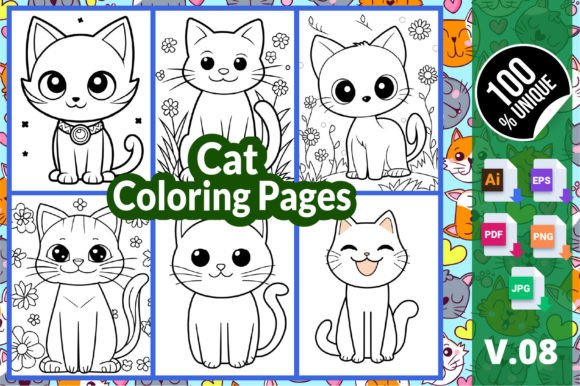
Cat Coloring Pages V.08 – A Versatile Template for Creative Projects and Publishing
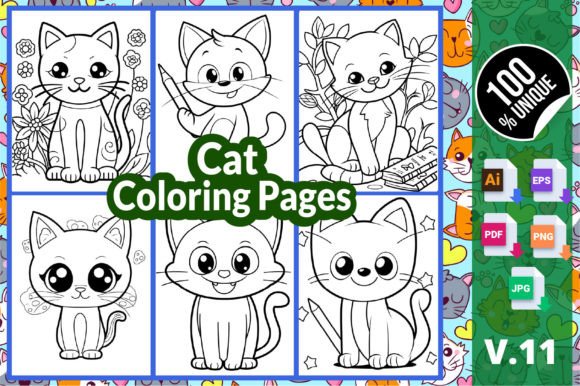
If you have spent any time in the content creation or self-publishing space, you know that a polished, adaptable asset can save hours of repetitive work. Cat Coloring Pages V.08 is exactly that kind of asset. It is a thoughtfully assembled collection of six hand-drawn cat illustrations available in multiple industry-standard file formats. Whether you are preparing a new title for Amazon KDP, building a printable activity bundle for your audience, or simply looking for stress-relief material for yourself, this template gives you a ready-to-use foundation that you can customize, rebrand, and scale on your own terms.
What Cat Coloring Pages V.08 Offers in a Practical Sense
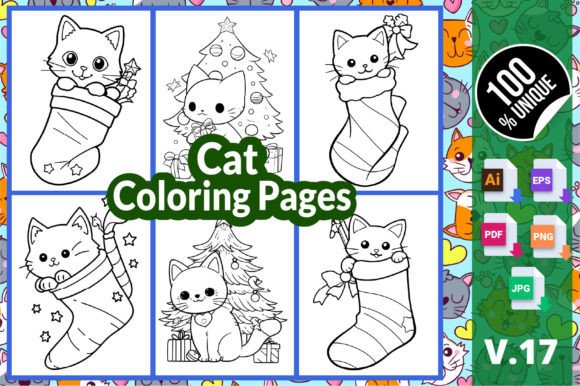
The package includes six distinct cat coloring pages, each formatted to fit an 8.5″ x 11″ inch sheet. What makes this template especially useful is the range of file formats provided. You receive AI (Adobe Illustrator), EPS, PDF, PNG, and JPG versions of every page. This means you are not locked into a single tool or workflow. Whether you prefer vector editing for clean scaling or raster formats for quick printing and digital distribution, you have the right file at hand. The high-resolution output ensures that the line art remains crisp whether you print at home, use a commercial printer, or display the pages on a screen.
For anyone building a high-content book business, the practical value is immediate. The template has been fully tested on the Amazon KDP platform, which means the dimensions, bleed requirements, and file specifications align with what the upload system expects. That alone can cut down your prep time considerably, especially if you are new to KDP or want to streamline a repeatable publishing process.
Understanding Each File Format in the Package
Before you start working with the template, it pays to understand what each file format is best suited for. The AI and EPS files are vector-based. You can open them in Adobe Illustrator or compatible vector editing software. These are ideal if you plan to edit individual elements, change line weights, or adjust the illustration style. The PDF file is a print-ready document that includes all six pages laid out properly. It works well for direct printing or as a submission file for platforms that accept PDF. The PNG and JPG files are raster images with transparent and opaque backgrounds respectively. PNG is useful if you want to overlay the cat illustration onto a different background or use it in a digital coloring app. JPG is a straightforward format for quick printing or sharing on social media to promote your book.
How Cat Coloring Pages V.08 Fits into a KDP Publishing Workflow
If your goal is to publish a coloring book on Amazon KDP, this template can serve as the interior content for your book. The typical process looks like this: you start by opening the PDF or AI file to review the pages. Then you decide whether to use the pages as-is or modify them. Because the template includes editable vector files, you can rearrange the order of the pages, delete illustrations that do not fit your theme, add new pages you have designed yourself, or incorporate clip art and decorative elements to build a more substantial book. Once you are satisfied with the interior, you export a print-ready PDF that meets KDP's specifications. The template's dimensions already match the standard 8.5″ x 11″ trim size, so you are ahead on that front.
You still need to create a separate cover file, but the interior is handled. For a six-page book, you might combine this template with other similar sets to create a larger volume of 60 or 100 pages. The process of importing multiple templates, arranging them, and exporting a single PDF becomes a repeatable workflow that you can execute in an afternoon once you have a system in place.
Preparing Your Files for Upload
When you are ready to upload to KDP, open the PDF file from the template and check that all pages are in the correct order. If you have added custom pages, ensure they match the 8.5″ x 11″ dimensions and have appropriate margins. KDP requires a minimum of 0.25-inch margins for content and 0.125-inch margins for books with fewer than 100 pages. The template already accounts for these specifications, but if you make edits, verify the margins are intact. Also confirm that your PDF is flattened and that all fonts are outlined or embedded. Vector files from AI or EPS can sometimes carry fonts that may not render correctly on KDP's system, so converting text to outlines before exporting is a reliable safeguard.
Using Cat Coloring Pages V.08 Beyond Book Publishing
This template is not limited to KDP. Its range of file formats makes it useful in several other contexts. If you are a teacher or a parent, you can print the JPG or PDF pages directly for classroom activities or quiet-time coloring at home. The cat illustrations are detailed enough to engage older children and adults, yet the subject matter is approachable for younger kids. For therapists or counselors who use coloring as a mindfulness tool, these pages work well as handouts in sessions or as part of a take-home kit. The consistent theme and professional line quality help create a calming, focused activity.
If you run a small creative business, you can use the PNG files to create digital products like Procreate brushes, digital coloring sheets for Etsy, or printables for a subscription box. The vector files also allow you to rescale the illustrations for larger formats such as posters or banners without losing resolution. This flexibility is what makes the template a practical asset rather than a one-use download. It is designed to be adapted, not consumed.
Customizing the Template to Match Your Brand or Style
The recommendation that comes with Cat Coloring Pages V.08 is to make it your own by adding, deleting, or rearranging pages. This is sound advice. The template gives you a solid foundation, but the final product should reflect your creative direction or brand identity. If you are publishing under a specific name or theme, consider modifying the line art to match a consistent style across multiple books. You might adjust the thickness of the lines for a bolder look, add background patterns, or incorporate your logo subtly on each page. For a more cohesive book, you can also unify the color palette of any sample covers or promotional materials you create.
When editing the AI or EPS files, work on a copy and keep the original files untouched as a backup. This allows you to experiment with different layouts or color treatments without losing the baseline. If you are not comfortable with vector editing software, the PDF and JPG formats give you a simpler path. You can still rearrange pages using a PDF editor or combine multiple JPG files into a single document using basic tools like Adobe Acrobat or even preview apps on your computer.
Organizing Your Coloring Page Assets for Efficiency
As you accumulate multiple templates and collections, organization becomes a practical concern. A simple folder structure can save you time. Create a master folder for your coloring page projects, with subfolders for each template set. Inside the Cat Coloring Pages V.08 folder, keep the original ZIP file intact for backup, then create separate folders for editable files, print-ready files, and any custom versions you produce. Name your files consistently using a convention like “Cat_Pages_V08_01_Print.pdf” or “Cat_Pages_V08_01_Edit.ai”. This makes it easy to locate the right file when you are in the middle of a publishing run or filling a custom order.
If you are using a cloud storage service, you can also tag files with project names or dates. This becomes especially useful if you publish multiple books under different brands or if you collaborate with a designer. A clear naming and filing system eliminates the guesswork that slows down production.
Quality Control Before Final Output
Before you print or upload any version of these coloring pages, run a quick quality control check. Open each page at 100% zoom on your screen and inspect the lines for any breaks, rough edges, or unintended marks. Because the template is provided in vector formats, the lines should be clean, but if you have made edits, a stray anchor point or an unclosed path can create visible issues in the final print. Also check that the resolution of any raster elements you added matches the 300 DPI standard for print. For digital use, 150 DPI may suffice, but print demands higher clarity.
If you are printing at home, test a single page on the paper you intend to use. See how the ink interacts with the paper and whether the lines are dark enough for coloring without bleeding through. For commercial printing, request a physical proof if the printer offers one. Small adjustments to line weight or margin placement at this stage can significantly improve the final product.
Long-Term Value and Scalability
One template set of six pages may seem small, but it becomes a building block for larger collections. If you purchase multiple templates like Cat Coloring Pages V.08, you can combine them to create books of 60, 100, or even 200 pages. The file formats are consistent across many product listings, so you can treat each set as a module that plugs into your publishing workflow. Over time, you build a library of content that you can recombine, update, and repurpose across different platforms and product lines.
This modular approach also helps with inventory planning. Instead of creating a new book from scratch every time, you can draw from your existing templates, customize the cover, and publish a fresh title in a fraction of the time. The scalability comes from having a standardized process and reliable assets that you know will pass the upload requirements and print well.
Integrating the Template into a Broader Creative Routine
For individuals who color as a hobby or a mindfulness practice, the template can be incorporated into a weekly routine. Print several pages at once and keep them in a folder. Set aside 15 minutes a day to focus on one page. The variety in the illustrations gives you enough novelty to stay engaged without being overwhelmed. If you use digital coloring apps, import the PNG files into your preferred program and color on a tablet. The clean lines and open areas in the drawings work well for both traditional media like colored pencils and markers, and digital tools like layers and blending brushes.
From a business perspective, these pages can also serve as lead magnets, freebies for email subscribers, or sample pages to promote a longer book. A well-executed coloring page that previews the quality of a larger collection can convert visitors into buyers. The high-resolution files ensure that even a single sample page reflects well on your brand.
Final Observations on Using the Template Effectively
Cat Coloring Pages V.08 is a practical template designed for people who want to move quickly from idea to finished product. Whether you are publishing on KDP, creating digital downloads, or simply looking for a relaxing creative outlet, the file formats and tested specifications reduce friction. The key to getting the most out of it is to treat the template as a starting point. Customize the layout, combine it with other assets, and build a workflow that fits your specific goals. With a little organization and some basic file management, this set of six pages can become a repeatable part of your creative process rather than a one-off project.