Wide Ruled-Composition Notebook KDP: A Practical Guide
If you have spent any time exploring print-on-demand or self-publishing, you already know that notebooks remain one of the most consistent categories in the Amazon KDP marketplace. The Wide Ruled-Composition Notebook KDP interior stands out not because of a flashy gimmick, but because it solves a real need: a clean, functional notebook that works equally well for students, professionals, and creative thinkers. At its core, this is a straightforward interior with wide ruled lines, but the structure and extras included elevate it from a simple blank book to a genuinely useful tool.
What makes this particular offering interesting is the combination of ready-to-upload files and editable templates. You get the convenience of a print-ready PDF, but you also retain full control over customization through a Canva link. That means you are not stuck with a one-size-fits-all design. Whether you need a notebook for journaling, lesson planning, or client handouts, you can tweak the layout, colors, and details to match your brand or personal preference.
What You Actually Get with This Interior
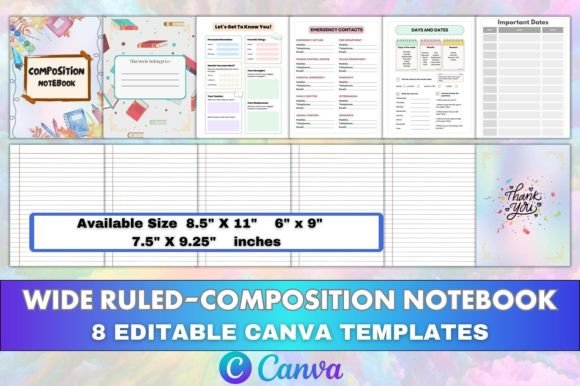
Before diving into creative possibilities, it helps to understand the components. This is not just a collection of lined pages. The interior includes:
- An Intro Page to set the tone or add a short description
- A Belongs to Page for personalization
- An All About Me section for the user to fill in details
- Emergency Contacts pages for quick reference
- Days and Dates for planning or scheduling
- Core Notebook Pages with wide ruled lines
- A Thank You Page at the end
These elements make the notebook feel complete without being overwhelming. The wide ruling itself is ideal for younger writers or anyone who prefers larger handwriting. It also works well for sketching quick notes alongside text, since the spacing is generous enough to allow for small diagrams or annotations.
The file package includes 8 editable Canva templates, plus PDF, PNG, and JPG versions in page counts of 100, 110, and 120. Trim sizes available are 8.5 x 11, 6 x 9, and 7.5 x 9.25 inches, all with no bleed and CMYK color at 300 DPI. That range gives you flexibility to publish in multiple formats without redoing the entire design.
Who Benefits Most from This Notebook Format
The wide ruled composition notebook is a classic for a reason. It is versatile enough to serve different audiences, and the extra pages make it suitable for more than just basic note-taking.
Educators and Tutors
If you create resources for students, this interior works well for homework logs, reading response journals, or writing practice books. The All About Me and Days and Dates pages help a learner feel a sense of ownership. You can customize the Canva template to add a subject-specific cover, instruction lines, or a progress tracker. The wide ruling is especially helpful for early elementary students or learners who need extra space for developing handwriting.
Small Business Owners and Freelancers
For those running a shop or service, having a branded notebook for client notes, meeting recaps, or project planning is surprisingly useful. You can edit the Canva link to insert your logo, choose consistent colors, and adjust the Emergency Contacts page to include your business details. The 6 x 9 inch size is portable enough to carry to meetings, while the 8.5 x 11 inch size works better for desk use or brainstorming sessions.
Creative Professionals and Hobbyists
Writers, designers, and illustrators often prefer lined notebooks with extra space. The wide ruling gives room for drafting ideas without feeling cramped. If you are publishing a guided journal or a creative prompts book, the included pages give you a ready-made structure. You can reuse the editable templates to create a series of notebooks with different covers but a consistent interior layout.
Creative Ways to Adapt and Use the Interior
Because you receive editable Canva templates, you are not limited to one look. Here are several practical adaptations:
- Customize the color palette to match a brand or theme. Change the line colors, header accents, and page backgrounds while keeping the wide ruled spacing intact.
- Add prompts or section headers to the notebook pages. For example, you could label every fifth page with a question or a word of the day for a vocabulary journal.
- Replace the All About Me section with a goal-setting page or a habit tracker if your audience is more oriented toward productivity.
- Use the Emergency Contacts page as a reference sheet for login credentials, project deadlines, or team contact info in a professional setting.
- Experiment with trim sizes based on the use case. A 6 x 9 inch notebook feels personal and portable, while 8.5 x 11 is standard for classroom or office settings. The 7.5 x 9.25 inch size is a nice middle ground that fits well on shelves.
The no-bleed specification simplifies uploading to KDP because you do not have to worry about content being cut off during printing. The CMYK color ensures that any design elements you add look accurate in print.
Practical Guidance for Publishing Your Version
When you are ready to turn this interior into a finished product, a few details will help the process go smoothly:
- Start with the Canva template. Make all your edits there first. Change the fonts, colors, and any text elements. Duplicate the template for different sizes if you plan to publish multiple versions.
- Export correctly. Download the PDF as print-ready (CMYK, high quality) for Amazon KDP. The PNG and JPG files are useful for previews, mockups, or Etsy listings if you sell digital files.
- Match the page count to your audience. 100 pages is good for a simple journal or a student notebook. 120 pages works for a more substantial book. For a semester-long planner or a project notebook, the higher count is preferable.
- Keep the layout consistent. Since the wide ruling is the main feature, avoid adding too many busy graphics. Extra icons or borders can distract from the usability. Simple headers and enough white space keep the notebook functional.
- Test print one copy before publishing widely. Even with a no-bleed setup, it helps to see how the binding affects the inner margins. Adjust the template if text gets too close to the spine.
Why This Interior Works for Both Professional and Casual Use
The design of this notebook does not lock you into a specific niche. The clean layout and the inclusion of reference pages make it feel thoughtful without being gimmicky. A teacher can use it for lesson planning. A writer can use it for first drafts. A parent can use it as a communication log with a child. The wide ruled lines accommodate handwriting of all sizes, which is something narrow ruled notebooks cannot offer as comfortably.
For someone publishing on KDP, this interior is a low-friction option. The files are prepared at high resolution and standard trim sizes, so you spend less time on formatting and more on the cover design and marketing. If you want to create a series of notebooks, you can reuse the same interior across different covers and themes, which builds a cohesive product line without starting from scratch each time.
The editable Canva link is a major time saver. You are not handed a locked PDF with no room for adjustment. You can modify the template to suit your own audience, whether that means changing the language, adding local emergency numbers, or shifting the layout from landscape to portrait orientation.
Keeping Your Notebook Clear, Organized, and Original
The best notebooks are the ones people actually want to write in. To make yours stand out:
- Choose a cover that signals the purpose. A minimalist design works for professionals. Bright colors and illustrations appeal to younger users. The interior should support the cover style, not clash with it.
- Write a clear product description. Mention the wide ruling, the page count, and the extra pages like All About Me and Emergency Contacts. Buyers appreciate knowing exactly what they are getting.
- Use the Thank You Page to add a personal touch. A short note or a space for feedback makes the notebook feel like more than just a commodity.
- Consider offering one free sample version or a low content preview. Some customers want to see the interior layout before buying. A few sample pages can build trust and reduce returns.
Final Thoughts on This Interior
The Wide Ruled-Composition Notebook KDP interior is a practical foundation for anyone publishing notebooks, journals, or planners. It gives you a complete structure, multiple file formats, and the freedom to customize through Canva. Whether you are creating for your own use, selling on Amazon, or providing branded materials for clients, the combination of wide ruling, helpful extras, and production-ready files makes it a solid choice. Focus on adapting the templates to your specific audience, keep the design clean and usable, and you will have a product that feels both professional and approachable.