Fitness Planner KDP Interior Template for Publishing
Creating a fitness planner for Amazon KDP requires more than just a good idea. The layout, formatting, and print quality often determine whether a listing gains traction or remains unnoticed. The Fitness Planner KDP Interior Template addresses this challenge directly, offering a professional foundation for publishing fitness-focused notebooks, journals, diaries, or planners. Whether you are a first-time publisher or an experienced creator, understanding what this template provides and how it fits into your workflow can save considerable time and effort.
A complete publishing toolkit in one package
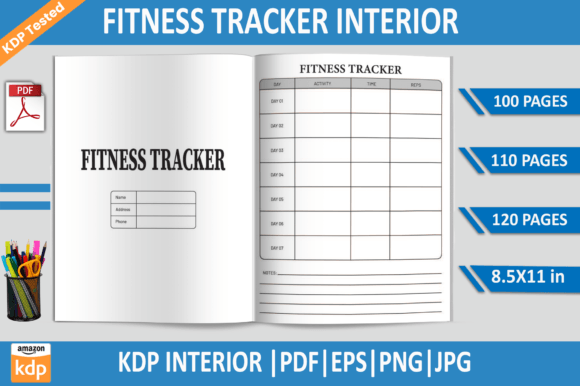
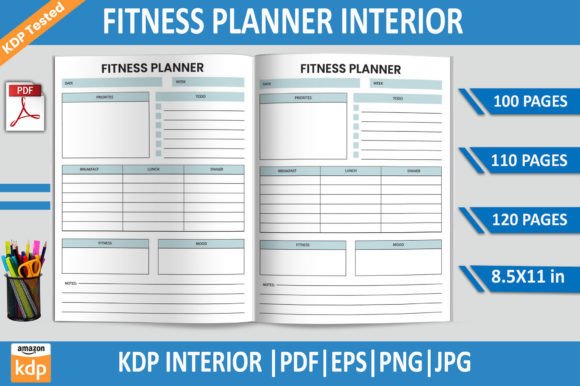
One of the most time-consuming aspects of KDP publishing is preparing files that meet Amazon’s strict formatting requirements. The Fitness Planner KDP Interior Template simplifies this process by including multiple ready-to-upload file formats. You receive PDF files at three page counts—100, 110, and 120 pages—so you can choose the length that best matches your content strategy. EPS, PNG, and JPG files are also included, giving you flexibility for both print and digital use.
All files come at a standard 8.5 x 11 inch trim size with 300 DPI resolution, ensuring crisp print quality. The template has been tested on Amazon KDP, which means common issues such as internal margin errors, bleed problems, or resolution mismatches are already addressed. This testing step alone can save hours of troubleshooting during the upload process.
Why file variety matters for different publishing goals
Publishers rarely work with one single file format from start to finish. The PDF files are print-ready and ideal for direct upload to KDP. But if you plan to customize sections, add your own branding, or create multiple versions of the same planner, the editable EPS file becomes indispensable. With Adobe Illustrator support, you can adjust colors, move elements, or insert new page types without rebuilding the entire layout.
The PNG files with transparent backgrounds are useful for creating preview images, social media promotions, or listing graphics. High-resolution JPG files serve the same purpose, especially when you need to show potential buyers what the interior looks like in a listing video or A+ content module. Having all these formats in one purchase streamlines your entire production pipeline, from design to marketing.
Practical benefits for busy publishers and creators
Time is often the scarcest resource for anyone publishing on KDP. Designing a planner interior from scratch requires attention to margins, page numbering, section spacing, and consistent styling across dozens of pages. The Fitness Planner KDP Interior Template handles these structural details so you can focus on content, cover design, and marketing strategy.
For example, if you want to launch a 12-week fitness tracker, the 100-page version offers enough room for tracking sheets, goal-setting pages, and weekly reviews. If you prefer a more comprehensive journal that includes meal logs, water intake trackers, and habit checklists, the 120-page variant accommodates that depth. The option to choose page counts means you are not forced to add filler content or cut valuable sections short.
Another practical benefit is the no-bleed format. Many new publishers struggle with bleed settings, often uploading files that get rejected during KDP review. With bleed already accounted for (or set to no bleed depending on your need), the upload process becomes more straightforward. The quality check performed on Amazon KDP adds an extra layer of confidence that your files will be accepted.
Who benefits most from this template
This template is particularly useful for publishers who want to create a fitness planner but have limited design experience. If you are comfortable with basic editing in Adobe Illustrator or similar software, you can personalize the interior without needing advanced graphic design skills. Freelancers and small business owners who publish branded planners for their clients will appreciate having a professional starting point that can be customized with logos and color schemes.
Entrepreneurs running multiple KDP stores often need to produce content consistently across different niches. Having a tested, versatile interior template allows them to experiment with various fitness planner angles—such as strength training logs, weight loss journals, or wellness diaries—without starting from scratch each time. Marketers and bloggers who create lead magnets or digital products can also use the JPG and PNG files for online content, building an audience before committing to a full print run.
Even experienced publishers may find value here, especially when testing new formats or expanding into new subcategories. Instead of investing hours in layout design for a concept that might not sell, you can use the template as a low-risk entry point. If the planner performs well, you can invest more time in custom designs later.
Making the most of editable files for customization
The EPS file is where much of the template’s flexibility lies. With Adobe Illustrator, you can modify fonts, adjust spacing, change the order of sections, or add new page types. For instance, if you want to include a monthly reflection page that the original template does not have, you can duplicate an existing page layout and modify it to fit your needs. This adaptability means the template can evolve as your publishing goals change.
If you are not familiar with vector editing, the PDF files themselves can be imported into various design tools for minor adjustments. Many free and paid applications support PDF editing, making this template accessible even if you do not own Adobe software. The PNG and JPG files serve as a fallback for quick uploads when you do not need further modifications.
Considerations when using a pre-designed interior
No template is a one-size-fits-all solution. While the Fitness Planner KDP Interior Template provides a solid foundation, some publishers may want to adjust the page count to fit a specific number of weeks or include specialty pages like progress photos or measurement charts. The template offers three standard page counts, but if your vision requires exactly 150 pages, you will need to add pages using the editable EPS file or combine multiple files.
Another consideration is niche specificity. A general fitness template works well for broad audiences, but if you are targeting a very specific group—such as runners preparing for a marathon or seniors focusing on mobility—you may want to add targeted content. The template gives you a head start, but the most successful planners often include unique elements that speak directly to a particular reader’s needs.
Quality testing on KDP is a strong feature, but it does not guarantee that every niche will respond equally. Listing performance depends on cover design, keyword strategy, pricing, and competition analysis. The interior is one piece of the puzzle, albeit an important one. Take time to review comparable planners in your chosen category to ensure your content stands out.
How this template supports long-term publishing strategies
Building a KDP catalog requires consistency. Publishing multiple planners in the same vertical can establish your brand as a go-to source for fitness content. Because this template comes in three page counts and multiple formats, you can create a series of planners with similar styling but different scope. A beginner might start with the 100-page journal, while more advanced users opt for the 120-page version with additional logs.
You could also use the template to test different price points. A shorter planner at a lower price may attract impulse buyers, while a longer, more comprehensive version can command a higher price. Having both options ready without extra design work makes it easier to experiment with your pricing strategy.
For publishers who also sell digital products, the PNG files with transparent backgrounds allow you to create mockups, promotional graphics, or even digital versions of the planner for platforms like Etsy or Gumroad. This cross-platform use extends the value of a single template purchase well beyond KDP.
Practical steps to get started
Once you download the Fitness Planner KDP Interior Template, begin by reviewing the PDF files to understand the layout and page structure. Open the EPS file in Adobe Illustrator if you plan to make changes, or use the PDFs directly if you are satisfied with the design. Adjust the file names to match your book title and ensure all pages are in the correct order before uploading.
Pay attention to the trim size and bleed settings when you set up your KDP manuscript. The template is designed for 8.5 x 11 inches, so select that size in your book setup. Upload the chosen PDF file, preview each page carefully, and use Amazon’s online preview tool to catch any issues before publishing.
Consider creating a test paperback order before going live. Seeing the physical product helps you assess paper quality, margin alignment, and overall feel. This step is especially valuable if you plan to produce multiple planners from the same template.
Final observations on template-driven publishing
Using a pre-made interior template is a practical approach to KDP publishing, especially for creators who want to balance quality with efficiency. The Fitness Planner KDP Interior Template offers tested files, multiple formats, and flexible page counts that reduce the friction involved in preparing a print-ready manuscript. While customization and niche focus remain important, having a reliable foundation lets you concentrate on the aspects of publishing that drive sales: content relevance, cover appeal, and audience connection.
For anyone looking to enter the fitness planner market or expand their existing catalog, this template provides a starting point that respects both your time and your creative vision. The key is to treat it as a tool, not a shortcut. With thoughtful customization and a clear understanding of your target reader, it can become a valuable part of your publishing workflow.